


Tips for working with values in Krita
Published on
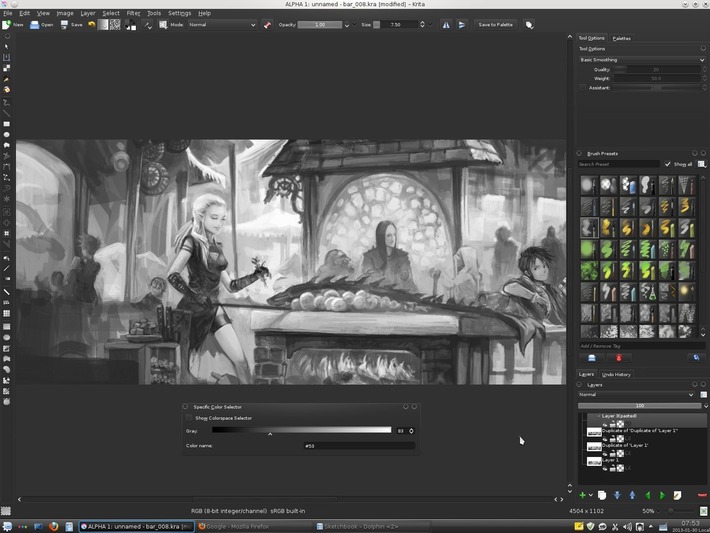
For black and white artworks or when you need to spend long time working on the values in your process , you 'll probably appreciate this ...
Specific Color Selector
- Add the docker 'Specific Color Selector' ( Top menu : Settings > Docker > Specific Color Selector )
- Check the box 'Show Colorspace Selector'
- Turn the model to 'Grayscale'
- Uncheck the 'Show Colorspace Selector'
- Resize the box to have a long width
... Now you have a wider range of selection for selecting precisely a value
Light pollution around
- To dim down all the polluting back-light of your display around artwork and help you to focus on your artwork, a good idea to change Krita for a darker theme.
Top menu : Setting > Theme > ...then choose.
I tend to work more in the 'Krita-blender' theme, or as on the screenshot above 'Krita-darker'
Note : Gnome / Xfce / Unity users may have a bad rendering. Install kde-style-oxygen package , and setup it with qt4-qtconfig to solve - Also, you can dim the value of the color 'around the canvas' in Krita
Top menu : Settings > Configure Krita -> ( display icon on the left column ) -> Canvas border : 'Color'
Depending the mood, I use or a dark value here ( 50 ) or a mid one ( 128 ) , but rarely above
Keyboard shortcut
You can press at any moment while painting this two mnemonic shortcuts
K for 10% darKer value
L for 10% Lighter value
Also, as a reminder : I for less opacI_ty, and O for more Opaque are just above , and M for Mirroring view ...
Save your workspace
Krita can save 'workspace' witch mean you can save mukltiple dockers positions depending your activities, or workflow
Toolbar : Last icon -> Insert a name -> Save
ex : here I have my trusty 'Black-White_1200x1600' workspace ready to launch for my screen.
