


My thoughts about the Save/Export refactor in Gimp 2.8
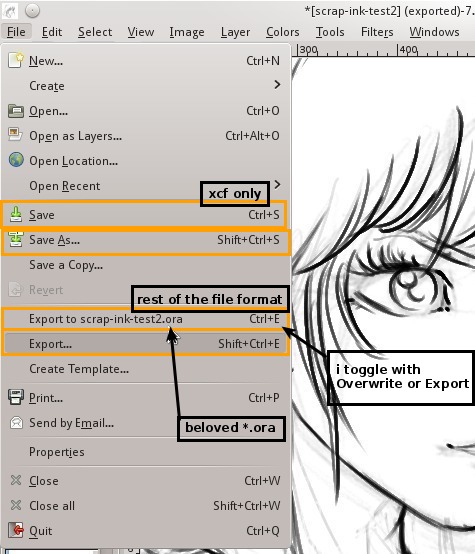
Gimp 2.8 Save/Export new behavior is far to be popular according to the gimp-development mailing list of this month or various feedback I had after my tweet about it. I try here to write a bit about it, and deliver some thoughts and proposition ... And even an immediate workaround solution.
Experience :
Personnaly, I never really was a fan of this new behavior. That said, it's not a big deal and I can live with it easily. It's less ergonomic for my digital painting workflow within Mypaint<>Krita<>Gimp via the .ora (open raster files) as it was before into 2.6. The behavior is just different and non consistent with my other softwares. I can't 'save' an .ora anymore, I have to export. It's confusing because I use the 'save' button for it in my 2 other digital painting applications. Just minor lost of time figuring my way on the Save/Export panel and brain gymnastic to remember I should behave differently now in Gimp.
Understanding :
It can be even surprising to hear me say that, but I like some aspect of this behavior and understand the choice of the Gimp development and respect it. New users aren't supposed to know all the files format, and guiding them to a single file format where all the working data are safe is a strong and right proposition of design. I teach digital art in school and workshops, and this user error trying to save all the layer of a magazine cover inside a *.jpg is very common. Avoiding that is something good. I also had a very good time with 2.8 when I contributed to re-texture a map of the open source game Nexuiz, as well as when I had to perform webdesign task (header, buttons, background). Its really cool to get the software protecting your source file, and an export file type and path the software remember for each source file. I could re-open very fast my sources .xcf , and export to the texture .tga, or the web *.jpg. It's a real boost of workflow into a project Gimp-centric.
Ideal propositions :
So, the design is good, and make sens. In fact; the problem appears only for user like me using another source file in the workflow. Using Gimp into an ecosystem of software? thats not part of the software design; Gimp is made to be Gimp-centric in a way and thought this way. And this move of the designer proove this point and this perspective quite well.
Well, it could works if Gimp was as awesome as Mypaint and Krita for digital painting and was the dominant leading graphic application of free software; but thats not the case (anymore?). A solution would be to convince Mypaint and Krita to adopt the same design (split Export and Save) and work around the same XCF file specification? Sure... ultimate solution! After all, .xcf is an open file format, has all layers, blending mode, vector, text, etc... and I would be happy to have a unified workflow. But in reality, no one have time for unifying things. Convincing Gimp developpers to add .ora as a source file like .xcf? I guess they would reply 'no' because .ora can't store for the moment Gimp 's vector path, text data, mask, etc... Too bad; 2 years ago I was really believing each actor of libre graphic softwares would work together and get an open raster file format for storing the source. So the situation is freezing, everyone do their own standard in their corner... and I guess things will not move before long.
Edit 2019: I'm rereading during a maintainance of the website, we are 7 year after I wrote this and things are still e-x-a-c-t-l-y the same. Even worst I would say.
Workaround
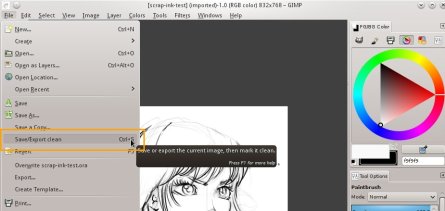
Gimp 2.8 Save/Export Clean Plugin of Akanna
My actual solution is the Save/Export Clean Plugin of Akanna. A little Python script to download and put under your folder /home/<username>/.gimp-2.8/plug-ins and mark it as executable. With the Edit > Keyboard shortcuts , I can attribute it Ctrl+S, and I attribute Ctrl+Maj+S to 'Export to'. Thats all, now things work as before for me, because I'm using mostly keyboard shortcut. Gimp doesn't warn me on closing because I didn't saved my file as .xcf.
This workaround doesn't use the default 'overwrite' entry to map to Ctrl+S (as proposed into this article), because after a single 'overwrite' the option in the menu disappear and let 'Export' replace it, and this one needs a new shortcut. I dislike this. Other problem; Gimp can't export to .xcf, so, I can't with my shortcut do an export for a xcf files.
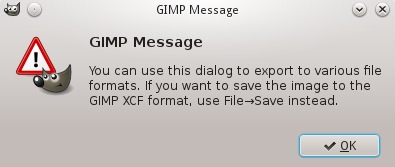
You can't export a XCF in Gimp ... c'mon , you really want I close now the save dialog after choosing a path and a filename to redo it ?
