David Revoy

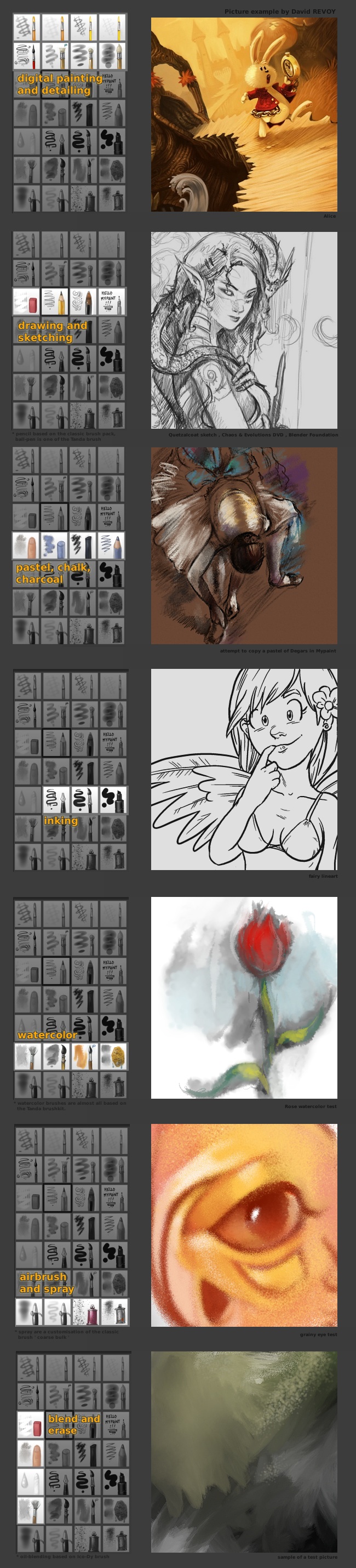
Mypaint V3 Brushkit

13 june 2010

Classified in : Resources

v3brushkit iconart preview

Resource updated : read the Version 4 post here : http://www.davidrevoy.com/index.php?article55/mypaint-v4-brushkit


Screenshots :


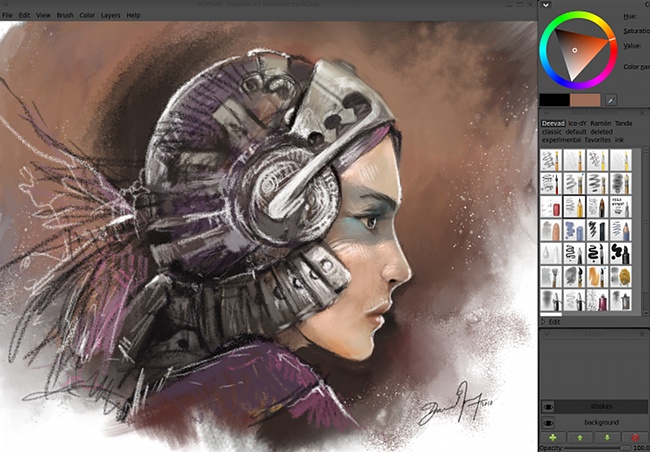
First screenshot : A speedpainting done with picking from a lot of brush in the V3 kit.
mypaint v3 screenshot


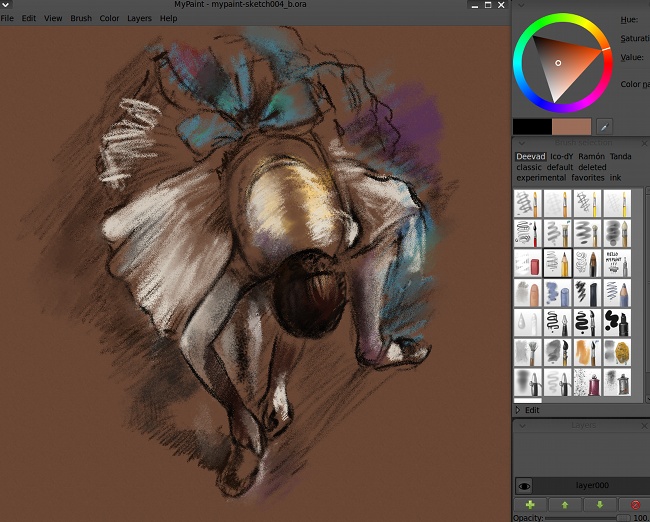
Second screenshot : an speed attempt to copy a pastel work from Degars to test the pastel row of the brush-kit in depht. Original art here.
mypaint v3 screenshotb


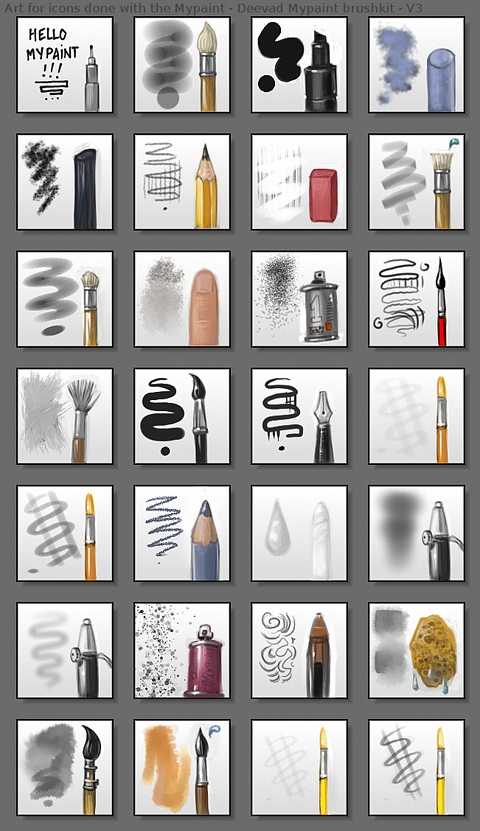
Details of the art painted for the icons, directly in the 'edit' panel of Mypaint. This work was done for fun and to look better for a large audience. Finally the colours ( inspired by the excellent Tango palette guideline ) and the funny painted tools are more efficient to fastly find a tool.

v3brushkit iconart preview

Infos :


mypaint v3 explications

Download :

Download the tar.gz archive : mypaint-deevadv3-brushkit.tar.gz ( 478 ko )

Install :

1.
Copy all the content of the folder V3brushes ( the PNG image files for preview, and the associated *.myb file for the brush settings ) to your ~/.mypaint/brushes/ folder. ( for windows user into the C:/Users/(xxx-your-session-name-xxx)/.mypaint )

2.
In your ~/.mypaint/brushes/ again , open the 'order.conf' file with a basic text software ( gedit, kate or notepad ), and copy this at the end , and save.

3.
Done ! Launch Mypaint and Happy painting

License :

The distribution and the files are under the creative commons 3.0 attribution. If you want to know more about ; read the following page here.

Exeption :
  • You are free to use those brushes files to draw / paint a commercial project without attributing me.
  • You can show them in a screenshot of your workflow or in a video screencast freely without attributing me.
  • You can show them in your school if you are a teacher or a student and do a presentation about on a CMYK ( paper / print ) support or a RVB ( video / internet / presentation / Tv ) without attributing me.
  • If you are a developper of an open source software, you can use them in your code for your software without attributing me.


Classified in : Resources

blog post by David Revoy

37 comments

Avatar Gravatar

sunday 13 june 2010, 14:46

Awesome work! excelent presentation of the kit. I have downloaded and i hope to test them as soon as arrive home.The thumbnails are great and the screenshots are lovable. good man, you have surprissed me again.

sunday 13 june 2010, 15:59

Thanks a lot Ramon for the comment smile

I'm happy if you liked my work on the presentation of this brushkit. Cause this V3 is mainly about presentation and thumbnails : you will see I don't bring really 'new things' to the Mypaint brushes ability or from my V2 brushkit. A lot of brushes come from the 'classic' set already in mypaint 0.5, some from Tanda set , and one from Ico_Dy. ( the detail is in the brush name, as well as on the big info picture in this blog post ).

I didn't picked brushes from your set cause I use them directly in your set, I like how the basic size of your brushkit are targeted to professionals with big sized brushes to work directly in zoom out to have resolution for printing.

Avatar Gravatar

3. Márcio Lacerda

sunday 13 june 2010, 19:45

Revoy, that his work with Mypaint is fantastic. The icons are very clear and intuitive this time, making it much easier time to use the tools ,that are perfect, with very diverse functions meeting the basic needs of any artist. Congratulations!

Avatar Gravatar

4. Jonathas Jackson

sunday 13 june 2010, 23:52

Hi david, first, congratulations for this work, i'm testing the brushes and all works very well, second, can i translate this page and share in my blog? linking this page of course.

Avatar Gravatar

5. Patricio Miñaur

monday 14 june 2010, 01:55

Excelete Brushkit! gracias por compartir tan útil herramienta.
Felicidades por tan buen trabajo.

monday 14 june 2010, 10:30

@Marcio Thanks ! ( sorry for the lake of accent on the 'a' in your name, but I don't have it on my keyboard )

@Jonathas ; translate is cool smile Thanks for the link.

@Patricios : Gracias wink

Avatar Gravatar

monday 14 june 2010, 16:15

Awesome, thanks!! ^,^

Avatar Gravatar

8. Sabra

monday 14 june 2010, 21:01

thanks for putting this up. I want this so bad on my program but I can't seem to get it right. When i open pain, I do see th V3 catergory beside Ico-dy and Classic, but nothing is underneath. I didn't see a order.conf, so I put it under the closest thing which was order. Please tell me what I did wrong.

monday 14 june 2010, 21:46

Thanks DeburgER !

@Sabra : If you don't have at all the brush in Mypaint, it mean you didn't copy well the *.PNG and the *.MYB files in the ~/.mypaint/brushes/ folder. May be try again and try to follow the install step carefully. I hope it will help ; if not tell me what is your system, we surely can try something else.

Avatar Gravatar

10. Sabra

monday 14 june 2010, 21:51

Thankyou so much for the quick response. I retried it about six times and I've got it working. Thankyou. And your artwork is crazy good. If your on youtube, I'll try to suscribe. Thanks again, you're awesome.

Avatar Gravatar

11. Rock Lee

monday 14 june 2010, 22:09

Wow, these tools were wonderful. The miniatures are beautiful, they were easier to visualize and gain an artistic aspect. Install them on windows is a bit tricky because I needed to add the brushes Mypaint folder in Program Files. They appeared on the default option, not a specific window, but that does not interfere with anything in the experiment. Grateful for the work.

monday 14 june 2010, 22:13

@Rock Lee : Thanks smile and good trick to install them directly in the 'programs files' folder.

Cool Sabra !
For my youtube channel , I use another pseudo :
http://www.youtube.com/user/kipitku
Have fun with the brush kit ;-)

Avatar Gravatar

13. EmileXXI

thursday 17 june 2010, 00:06

Thanks you very much for the time an effort you spent to give us that brush-kit. It is really amazing and it matches so well with your digital painting DVD. I think this brush-kit might be a crucial step to make Mypaint closer to Painter, in my concern.
Thank you again.

Avatar Gravatar

14. Chris Stockton

friday 18 june 2010, 22:12

Wow, thanks. Put these on as soon as I found them. Excellent work great brush set, wonderful icons. Just go a Wacom tablet two weeks ago, so can't wait to break it in with these.

Avatar Gravatar

15. Riste Sekuloski

sunday 20 june 2010, 11:04

David, thanks for the amazing brushes. I have to say that your set is as close to real thing as possible (I think that they feel more natural than anything I've tried out there)

Also, thanks for the amazing tutorials (inking and painting one is incredibly useful)

Avatar Gravatar

16. erik90mx

tuesday 22 june 2010, 07:20

My Paint is excelent!!!

Is the only one that recognise my Wapcom big_smile
How do you have layers in My Paint? (an other version??)

arrg... Gimp is excelent but... when I install your kit and try to paint, every single brush is very slow :S (with painter)
and It don't recognize the wapcom . (Whay is sooo slow!!!, if I have 4 of ram and a Phenom x4 II 940 )

Greetings

PD: Do you have some tips for draw hands??

Avatar Gravatar

17. Ricardo (Gamby)

tuesday 22 june 2010, 17:22

(If french-english is a pain-blend, imagine the spanish sun between the english clouds and you can see the disaster... big_smile... Well, i hpoe you can understand what I have written.
I think you are one of the greatest artist at the moment, and i try understand the art's concepts, as you can do.... Have a lot to study, yes, but i have zero money to pay, and now i can't buy anything ... I desire your chaos&evolutions.... but for me now the brushes are a present incredible....
Best regards... from your south neighbor... Gamby..

Avatar Gravatar

monday 28 june 2010, 18:20

Very cool deevad! I love the presentation and the overall work you've put into this!
.
Griatch

Avatar Gravatar

19. PuFFiN

wednesday 30 june 2010, 01:20

Hello Mr Revoy,
Your artwork is amazing! I love your colouring! smile
And thank you so much for these mypaint brushes, I really appreciate the extra work you put into making the icons look unique and informative as well! ^_^
--PuFFiN

Avatar Gravatar

20. nack

wednesday 07 july 2010, 14:43

The same are on the dvd?

friday 09 july 2010, 13:37

Hi Thanks for the comments ; to answer various question :

- Layer are in Mypaint ; ( in the menu > Layer ), and the best keystroke shortcut driven layer stack in my opinion. I use layer only with the keyboard.

- This brush kit is not on Chaos & Evolutions , I made this brush kit after the Dvd.

Thanks again !

Avatar Gravatar

22. cacysunlee

monday 12 july 2010, 11:54

hello david

i love your style and your paintings
thank you very much for all your goodies, especially for this brushkit

best regards

Avatar Gravatar

23. andreamer

tuesday 27 july 2010, 10:11

wow, thanks i was looking for brushes with icon reference fot mypait, just great!

Avatar Gravatar

24. Alexey Ost

tuesday 10 august 2010, 13:50

Good brushes... and little question, how you make your grey interface?!) Very pleasantly for look, yes!) smile

tuesday 10 august 2010, 22:43

Thanks a lot for the comments smile

Alexey : I will copy paste here a part of My DVD Chaos&Evolutions ; cause I write precisely in it my settings. Of course this grey windows Ui depend of Gnome ( My Linux Mint system ) :

"
All the Dvd screenshots use the same dark Gnome theme, It's a customized theme I always use. Here are the settings if you want to have the same on your machine.
To access the panel for new users :

* right click on the wallpaper (desktop ) > Change Desktop Background
* Under the theme panel click "Customize"

the settings are under.
The main dark theme :

* Controls : ClearlooksClassic
* Colors : Windows : background (#4F4F4F) Text (#000000)

Input boxes : background (#717171) Text (#1A1A1A)
Selected items : background (#2B2B2B) Text (#CCCCCC)
Tooltips : background (#FFFFFF) Text (#000000)

* Windows Border : AuroraMint ( Aurora )
* Icons : GNOME-Tribute


The brighter theme :

* Controls : ClearlooksClassic
* Colors : Windows : background (#EDECEB) Text (#000000)

Input boxes : background (#FFFFFF) Text (#1A1A1A)
Selected items : background (#EDECEB) Text (#FFFFFF)
Tooltips : background (#FFFFFF) Text (#000000)

* Windows Border : AuroraMint ( Aurora )
* Icons : GNOME-Tribute
"

Avatar Gravatar

26. Alexey Ost

thursday 12 august 2010, 17:29

Oh, this certainly help for me if I be use Linux...
...but thank you David!)

You helped me, since I thought that at mypaint there is their own themes!) And that I simply has not found their!))) (^_^)

And now I have cool dark mypaint and... very... very strange browser!))) XD


Best regards, Alexey Ost!) smile

Avatar Gravatar

thursday 19 august 2010, 21:01

This is likely the most valuable thing you could have ever done for yourself, David. It takes me back to when I was a graphic designer for a year. I had lots of custom brushes for doing all sorts of things very specific to the tasks that I needed to do every day. Later, when I lost that job, they wiped the computer and thus I lost all my brush presets. There's something about my new collection of brushes that just doesn't come close to what I had. When you're doing it every day, the refinement isn't just in an order of magnitude by how many days you use them, but it compounds by how many days you used them in a row, and how frequently, and why.

In a way, you sort of made up your own software here. Mypaint will become Davidpaint. And for that, I thank you.

Avatar Gravatar

28. MaxTux

tuesday 24 august 2010, 10:28

Thank you David for your brushes, very useful, i write from Italy and i really appreciate your works, i've linked this post in my blog:
,
http://www.hokmaph.net/blog/?p=459

Max

Avatar Gravatar

29. salkis

thursday 26 august 2010, 19:36

hello David, this is wonderful job thanks for all the brushes. Can you please tell me how to change the pencil setting so that it actually makes a 1-2mm stroke each time I make a dot (each time I press the pen or mouse). In that way I can stimulate the strokes of a sketch in pencil.

Please reply

Avatar Gravatar

30. Ashwin Nandihalli

tuesday 23 november 2010, 10:42

thank you its great stuff

Avatar Gravatar

friday 10 december 2010, 04:06

I always forgot to thanks
But thank you very much for making this great brush kit ^___^
I love to use it XD
Ah! I also subcribe for your video in youtube ^^

friday 10 december 2010, 04:26

@alexey Ost : Cool ! I shall do a blog post about the dark color gnome Ui smile

@Wray Bowling : I laughted a lot for the 'Davidpaint' smile Thanks ! and thanks for sharing your story about brush kit; this reminded me the old time when I used Photoshop and only use a compilation of others brush kit.

@MaxTux : Thanks for doing a blog post about it !

@Salkis : Sorry for the late reply ; ( my excuse is ... : 'Sintel' ) I think you should rise up the diameters of the brush and reduce the dynamic on the opacity.

@Ashwin Nandihalli : smile

@Hayashi Nomura : Thanks for the brush + subscription smile Cool deviant art gallery ; I 'm jealous of your mastering of this romantic anime style smile Perfect for story telling about love; a cool 'drawing' tool. Keep good job !

Avatar Gravatar

33. peter

friday 07 october 2011, 20:02

hello david...
your are absolutly out of your mind.it´s youre fault that i now own four programs to find out what my imagination is all about!
i downloaded my paint,alchemy,gimp and my sister gave blender to me as a birthday gift last december.
your drawings are really really really,did i just say really three times...
wonderfull!!!first picture i painted in (my paint only) was a tornadoscene,and i was just like wow as i looked at the result one hour later.the glow pencil gave realistik looking lightnings and so on.i´m totally amazed.i´ll definently keep your site in my eyes because you know:IT´s YOUR FAULT!!!greet´s n´best wishes from westwood,germany.

saturday 08 october 2011, 22:31

@peter : Thanks a lot for the fun comment Peter wink

Avatar Gravatar

35. Grace

friday 31 august 2012, 08:08

Really i thank u so much for all your brush kits and open advises make me to workly boldly with gimp.. thank u so much once again

Avatar Gravatar

36. Grace

friday 31 august 2012, 08:09

Vraiment je remercie u infiniment pour tous vos ensembles de pinceaux et d'ouvrir conseille de me faire travailler hardiment avec gimp .. thank u tellement nouveau

friday 31 august 2012, 11:15

@Grace : Merci ! ^ ^

Write a comment

What is the second letter of the word ipcmq? :