David Revoy

Numpad hack for Mypaint

25 september 2012

Classified in : Software & Hardware


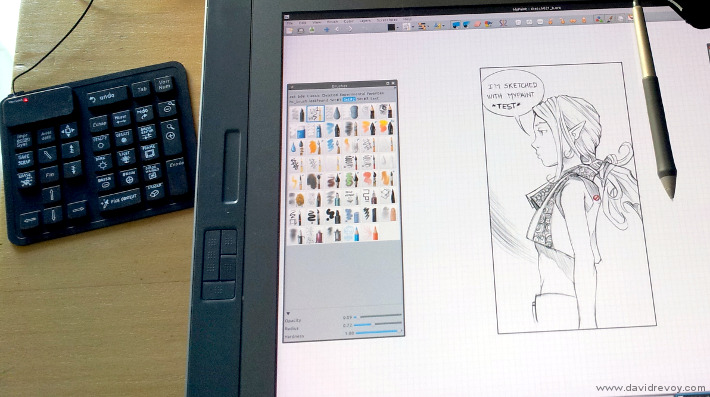
While doing shopping today I found in a discount supermarket a flexible numpad sold only 2.79€ . Cheap enough to do test and add it to my basket. It's work plug and play in 12.04, and so I decided to customise it a bit to transform it as shortcut pad next to my Cintiq.

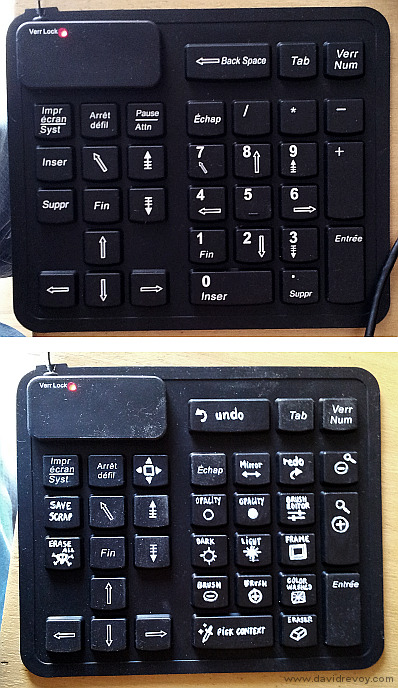
I tested in Mypaint the key I could attribute as shortcut, then painted all those configurable slot with black acrylic to erase the symbols . The new white symbols were painted with a white decorative pen, acrylic based too. Only one hour was suffisent to do it, and for sure, after a little sketch, this pad is way better than my old Gamepad hack


Image : the top one is the aspect right out of the box , and bottom is my final customisation ( sorry for the dusty aspect, the sun angle and auto sharpening of my camera were not friendly for this picture ) .

Classified in : Software & Hardware

blog post by David Revoy

5 comments

Avatar Gravatar

1. partage photos gaulois

tuesday 25 september 2012, 11:56

Trop fort David ! Juste un regret: on ne peut pas peindre les touches avec MyPaint smile

tuesday 25 september 2012, 13:59

@partage photos gaulois : big_smile

Avatar Gravatar

3. mrspacklecrisp

tuesday 25 september 2012, 16:12

Much cleaner, I quite like it. I would use my little NES controller as is though— D-pad for moving about the canvas, A for zoom in, B for zoom out, and START and SELECT for color and brushes!

Avatar Gravatar

tuesday 25 september 2012, 16:15

Hello,
Was it difficult to configure it to work with mypaint?

Chris.

tuesday 25 september 2012, 16:23

@mrspacklecrisp : Oh oh , a Nes controller have the extra "icing on the cake" for the decorative aspect. Sound a cool mod.

@Chris Williams : Setting shortcut in Mypaint is really easy. Just go to the 'Mypaint' menu , and with mouse over menu items just press the shortcut you want. It's the easiest method of the world ! The setup took me less than a minute. The cons are ; it maps also your "real keyboard" shortcut to the numpad layout. As my Cintiq is in rare use, and connected to my laptop, I use exclusively Mypaint on it ( other softwares lag too much ).
On my other pc , I use another set of keyboard shortcut based on my french azerty keyboard
Where
; : = brush - and brush +
k l = darker and lighter
i o = less opac , more opac
m = mirror
! = washed color popup big_smile

I also very like the default shortcut of Mypaint, they are really smartly made.

Write a comment

What is the first letter of the word fbndfn? :